
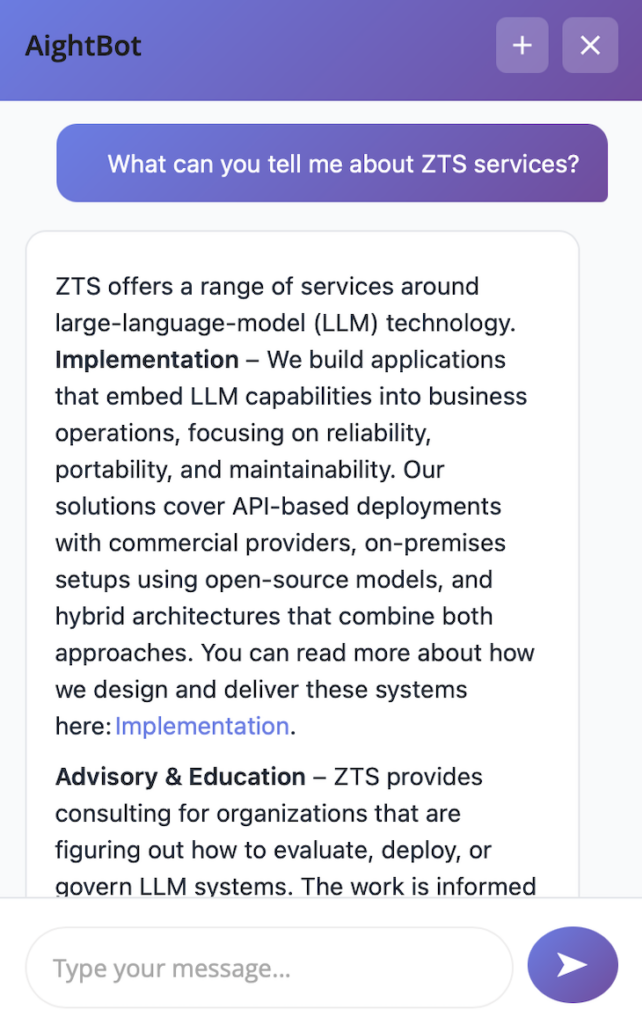
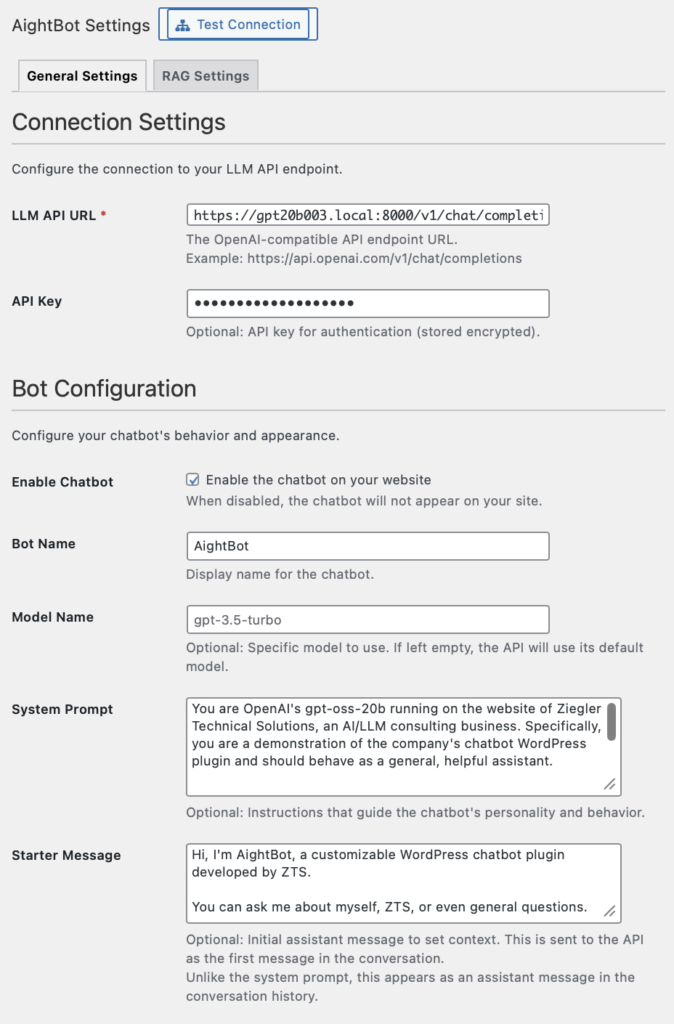
This case study examines architectural decisions that enable LLM conversations in WordPress while preserving data control. The approach uses browser-based session storage, database-backed conversation state, and MySQL FULLTEXT for content retrieval. These choices prioritize deployment simplicity and infrastructure compatibility over advanced capabilities.
See our AightBot WordPress LLM Chatbot Plugin on GitHub.
Context and Problem
WordPress sites benefit from conversational interfaces across many use cases: answering product questions, explaining services, helping visitors find content, handling support inquiries, and providing guided experiences. The platform’s request-response architecture creates specific constraints: stateless PHP processes, database-centric state management, and deployment patterns ranging from shared hosting to multi-server configurations.
The engineering question is how to integrate LLM capabilities within these constraints while maintaining data locality and operational simplicity. External chat services work but route conversations and content through third-party infrastructure. For organizations handling proprietary content, customer interactions, or operating under compliance requirements, this creates unacceptable exposure.
The focus is on engineering tradeoffs: why sessionStorage provides appropriate session lifecycle for typical website conversations, when MySQL FULLTEXT is sufficient for content retrieval and when it is not, how WordPress transients enable rate limiting in most deployments, and where the architecture reaches its limits.
Session State: Matching Storage to Use Case
LLMs are stateless. Conversation continuity requires maintaining context across requests. The architectural decision is where to store conversation history and for how long.
For most website chatbot scenarios, conversations are ephemeral. A visitor asking about pricing, return policies, or product features does not need that context to persist for days. Most sessions last minutes. This usage pattern enables simpler state management than applications requiring long-term conversation history.
Storage Choices
Database tables provide consistency across load-balanced servers. All servers share the same session state. A user’s request hitting any server retrieves the same conversation history. This works reliably in standard WordPress deployment patterns.
The cost is database I/O on every message. For WordPress installations already using the database for content, sessions, and caching, adding conversation storage uses existing infrastructure. The database is already there. For installations experiencing database bottlenecks, conversation load amplifies existing problems rather than creating new ones.
WordPress transients use the database by default but support object cache backends (Memcached, Redis) when available. This provides faster access and automatic expiration. For session data where exact expiration timing is not critical, transient behavior is appropriate.
File system storage works well for single-server deployments and avoids database load entirely. Multi-server configurations require shared storage, which most WordPress hosting does not provide. This makes file storage less suitable for deployments that might scale horizontally.
Database tables with indexed cleanup provide consistency without requiring infrastructure beyond WordPress itself. For deployments handling hundreds of concurrent conversations, this works reliably. For thousands of concurrent conversations, WordPress architecture itself becomes the constraint before session storage does.
Client-Side: sessionStorage for Appropriate Session Lifecycle
Browsers provide localStorage (indefinite persistence) and sessionStorage (clears on browser close). For typical website conversations, sessionStorage provides appropriate session lifecycle.
Visitors asking questions during a browsing session do not need conversation history to persist across sessions. When they close their browser, the conversation context ends. This matches expected behavior for most website interactions.
sessionStorage also simplifies server-side cleanup coordination. Browser closes, client storage clears, server cleanup occurs within an hour. No special handling for stale session IDs where the client has a session identifier the server already cleaned up.
For applications requiring persistent conversation history across devices and sessions, different architecture is necessary. The session-based approach explicitly optimizes for ephemeral conversations.
Session Cleanup
Server-side sessions require cleanup to prevent unbounded database growth. Hourly cleanup removes sessions inactive for more than one hour. This is more aggressive than typical 24-hour web session retention, reflecting the expected usage pattern: users interact during a visit, then leave.
Aggressive cleanup provides two benefits:
- Storage efficiency: Conversation data does not accumulate indefinitely
- Privacy: Sensitive conversation content persists for limited time
WordPress cron triggers on page loads. For active sites, cleanup runs reliably on schedule. Low-traffic sites may experience delayed cleanup until the next page load. For deployments requiring guaranteed cleanup timing independent of traffic, system cron invoking WP-CLI provides deterministic scheduling.
The cleanup query is indexed and efficient:
DELETE FROM wp_aightbot_sessions
WHERE last_active < DATE_SUB(NOW(), INTERVAL ? HOUR)
For very high-traffic sites generating thousands of sessions daily, table partitioning provides faster cleanup. Time-based partitions enable dropping entire partitions instead of DELETE operations. This adds schema complexity but scales better for high-volume deployments.
Content Retrieval: FULLTEXT for WordPress Content
RAG enables the bot to search site content and cite specific pages when answering questions. The choice is between MySQL FULLTEXT and vector databases with embedding models.
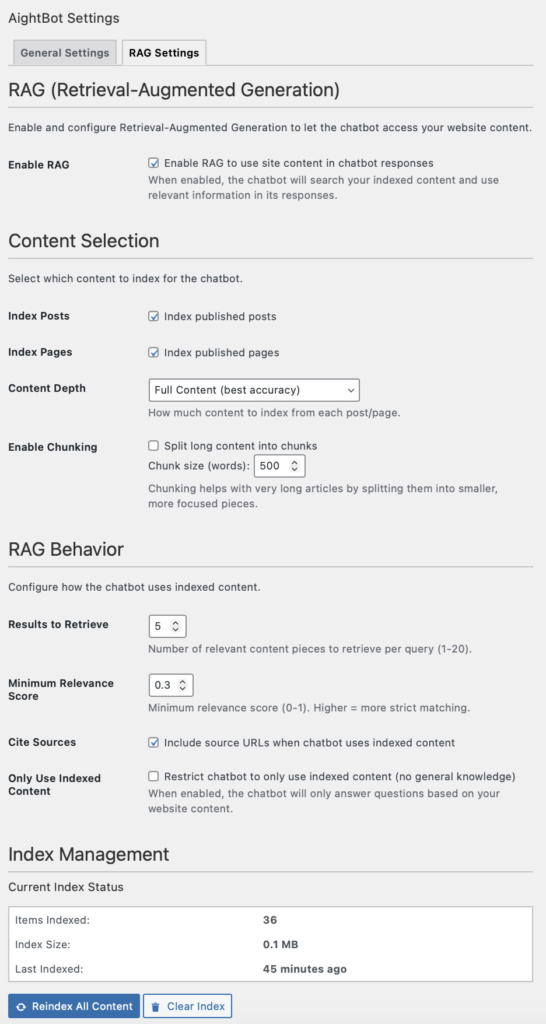
For content-driven sites where queries and content use similar vocabulary, FULLTEXT provides adequate retrieval without additional infrastructure. A visitor searching “shipping options” matches content containing “shipping options”. This works well for straightforward content retrieval.
Why FULLTEXT Works
WordPress installations already have MySQL. FULLTEXT indexes are standard DDL. No embedding models to deploy. No vector databases to maintain. No GPU requirements. This simplifies both initial deployment and ongoing operations.
For administrators managing WordPress sites, FULLTEXT is familiar technology. Query performance is predictable. Debugging is straightforward. This matters for organizations without specialized infrastructure teams.
FULLTEXT quality depends on vocabulary alignment between queries and content. Sites where visitors and content use consistent terminology see good results. Product pages with clear descriptions work well. Service pages answering common questions work well. FAQ content structured around actual visitor questions works well.
When Vector Search Becomes Necessary
Vector search provides semantic matching through high-dimensional vector similarity. Queries phrased differently than content can still match based on meaning. “How do I get my money back” matches content saying “refund policy” based on semantic similarity, not shared keywords.
The infrastructure requirements:
- Embedding model (300-500MB) in memory
- Vector embeddings for all content
- Vector database or ANN index (FAISS, HNSW)
- Deployment and operational expertise for these components
For WordPress on shared hosting or standard VPS configurations, this infrastructure often is not available. Organizations with existing ML infrastructure can add vector search more easily. Organizations without it face substantial operational overhead.
Vector search is necessary when:
- Content uses varied vocabulary for the same concepts
- Queries phrase questions differently than site content
- Technical terminology and abbreviations are pervasive
- Search quality directly impacts business outcomes
For these scenarios, the additional infrastructure complexity is justified. For sites with consistent terminology and well-organized content, FULLTEXT provides adequate retrieval with simpler operations.
FULLTEXT Characteristics and Appropriate Use
MySQL FULLTEXT has specific characteristics that determine when it is appropriate:
Minimum word length: Default 4+ characters. Searches for “API”, “FAQ”, “CSS” return no results. This is configurable via ft_min_word_len where database access permits. For sites with many acronyms or short terms, this requires either configuration changes or content written with searchability in mind (using full terms alongside abbreviations).
Stopword filtering: Common words are ignored. “The process for refunds” indexes “process” and “refunds”. This works well for substantive queries. It can miss queries phrased as natural questions.
Lexical matching: Pure token matching without semantic understanding. “Running” does not match “run”. Synonyms do not match. This is appropriate when content and queries use consistent terminology.
Word matching behavior: MySQL FULLTEXT uses word boundary detection and basic tokenization. Matching behavior varies between MySQL 5.7, 8.0, and MariaDB variants. Testing against target infrastructure is necessary.
These characteristics mean FULLTEXT is appropriate when:
- Site content uses consistent terminology that matches how visitors phrase questions
- Content is well-organized with clear headings and descriptions
- Search terms are typically complete words rather than abbreviations
- The site handles hundreds or thousands of pages rather than millions
For sites meeting these criteria, FULLTEXT provides reliable retrieval without operational complexity. For sites with inconsistent terminology, heavy use of acronyms, or semantic search requirements, vector search becomes necessary despite the additional infrastructure.
Relevance Thresholding
FULLTEXT returns TF-IDF scores relative to each result set. A score of 0.5 from one query is not comparable to 0.5 from a different query.
Threshold calibration requires analyzing actual queries against content. Default of 0.3 works for many sites. Content with high keyword density may require higher thresholds to filter marginal matches. Sparse content may require lower thresholds to return any results.
Proper calibration means testing with representative queries from actual visitors. The appropriate threshold depends on content structure and vocabulary overlap. This is not a limitation; it is a tuning parameter that should be adjusted based on observed behavior.
URL Rendering and XSS Protection
LLMs generate text containing URLs from RAG citations. These need to render as clickable links while maintaining XSS protection.
Standard XSS protection escapes HTML before rendering: < becomes <, > becomes >. This prevents script execution but also prevents HTML links from rendering. When the LLM returns <a href="https://example.com">Example</a>, escaping converts it to escaped text rather than a clickable link.
The solution converts citation formats to markdown before HTML escaping:
// Convert citations to markdown BEFORE escaping
text = text.replace(/@cite\(([^)]+)\)/g, '[$1]($1)');
text = text.replace(/Source:\s*(https?:\/\/[^\s]+)/gi, 'Source: [$1]($1)');
text = text.replace(/<a\s+href=["']([^"']+)["'][^>]*>([^<]+)<\/a>/gi, '[$2]($1)');
// Escape HTML (prevents XSS)
text = text.replace(/</g, '<')...
// Process markdown to HTML (creates safe links)This maintains XSS protection while enabling clickable citations. LLM output is normalized to markdown, HTML is escaped for safety, then markdown is converted to sanitized HTML links.
The approach handles common LLM citation formats. Different models may generate citations in formats not covered by these patterns. The regex approach provides adequate coverage for typical use without external dependencies. For deployments requiring comprehensive HTML parsing, proper HTML parser libraries provide more robust handling at the cost of additional dependencies.
Rate Limiting with WordPress Transients
Per-session rate limiting prevents individual users from overwhelming the API while allowing legitimate use. Default configuration allows 20 requests per 60-second window, suitable for typical conversational interactions.
The implementation uses WordPress transients to store request timestamps keyed by session ID:
$timestamps = get_transient('aightbot_ratelimit_' . $session_id);
$current_time = time();
$cutoff_time = $current_time - $time_window;

$timestamps = array_filter($timestamps, function($ts) use ($cutoff_time) {
    return $ts > $cutoff_time;
});

if (count($timestamps) >= $max_requests) {
    return false;
}

$timestamps[] = $current_time;
set_transient('aightbot_ratelimit_' . $session_id, $timestamps, $time_window + 60);
This works reliably for typical WordPress deployments. Single-server installations work without additional configuration. Multi-server deployments work when transients use shared storage (database by default, or shared object cache when configured).
Multi-Server Deployments
WordPress transients default to database storage, providing shared state across load-balanced servers. When object caching is enabled with shared backends (Memcached, Redis), transients use the cache for improved performance while maintaining consistency.
The approach works correctly when:
- Transients use database storage (WordPress default)
- Object cache is shared across all servers
- Cache instances are properly configured for multi-server access
Configuration issues arise when each server has its own local cache instance. In this scenario, each server maintains separate rate limit counters, and the limit becomes effectively per-server rather than per-session. This is a deployment configuration issue rather than an architectural limitation.
For deployments requiring stronger rate limiting or handling adversarial scenarios, dedicated rate limiting infrastructure (Redis with atomic operations, API gateway rate limiting) provides additional capabilities. For preventing typical abuse patterns, transient-based rate limiting is sufficient and requires no additional infrastructure.
Security Considerations
Conversational interfaces introduce different security considerations than traditional form-based interactions.
Prompt Injection: Understanding the Landscape
LLMs process natural language instructions. User messages, system prompts, and conversation history all become input. Adversarial users can attempt to override instructions through carefully crafted messages.
This is an inherent characteristic of current LLM architectures, not a solvable engineering problem. LLMs are trained to follow instructions in natural language. Distinguishing adversarial instructions from legitimate ones is fundamentally difficult when both use natural language.
The appropriate security posture:
- Treat user input and retrieved content as untrusted
- Limit what actions the LLM can trigger (read-only operations for content retrieval)
- Use system prompt engineering to reduce susceptibility
- Monitor for unusual patterns
- Keep humans in the loop for high-stakes decisions
For use cases where the bot answers questions from public site content, prompt injection risk is limited. The worst outcome is the bot providing incorrect information, which users can verify against source content. For applications where the LLM controls write operations or accesses sensitive data, additional safeguards are necessary.
Retrieved content from RAG creates another consideration. Pages containing specific phrasing might influence model outputs. For public sites, this is acceptable risk. For sites where untrusted users can create content that might be indexed, additional filtering may be necessary.
API Key Security
Encryption protects keys at rest using AES-256-CBC with keys derived from WordPress security salts. This prevents cleartext exposure in database backups and during file system access.
Keys are decrypted into memory during API calls. Server compromise can expose keys regardless of encryption. This is inherent to any system that must use API keys.
For deployments using local inference without authentication requirements, encryption provides no additional security. For deployments using hosted APIs, encryption at rest is standard security practice.
Salt regeneration during security hardening invalidates stored keys. Administrators must re-enter API keys after changing WordPress salts. This is expected behavior when security salts change.
Data Retention and Privacy
Conversations persist server-side until cleanup runs (one hour after last activity by default). This is appropriate for most chatbot scenarios where data retention serves debugging rather than business purposes.
Organizations with specific data minimization requirements can:
- Reduce retention below one hour
- Disable logging entirely
- Configure more aggressive cleanup schedules
- Use local inference to avoid sending data to external APIs
The default configuration balances operational needs (debugging, understanding usage patterns) with privacy considerations (aggressive cleanup, ephemeral storage). Organizations can adjust these parameters based on their specific requirements.
Operational Characteristics
Context Window Management
LLM context windows are finite. Most website conversations rarely approach these limits, but extended interactions can.
The implementation truncates conversation history when it exceeds configured limits (40 messages or 8000 words by default). This keeps recent context and discards older messages. For most visitor questions, this works well. A user asking several unrelated questions does not need the first question’s context for the last answer.
For extended conversations, truncation can remove relevant early context. Example:
User: "What's your return policy?"
Bot: [explains 30-day returns with receipt]
3-20. [Various other questions]
User: "You mentioned returns earlier - do I need the receipt?"
Bot: "I don't see previous discussion about returns."
The bot’s response is correct based on available context. Messages 1-2 were truncated. This is a known characteristic, not a defect. Applications requiring full conversation history need different architectures (conversation summarization, external storage, larger context windows).
For most sites, queries are relatively independent. Context truncation rarely affects user experience.
Startup and Response Latency
Chat widget loads on every page but conversations start only when users interact. First message response time includes API latency, database queries, and any RAG content retrieval. Subsequent messages benefit from established connections.
For hosted API deployments, response latency is typically 1-3 seconds. Acceptable for conversational interactions. Users expect chat interfaces to take longer than keyword search.
For local LLM deployments, cold start includes model loading (3-10 seconds for quantized models on consumer GPUs). Production deployments keep inference servers running with models preloaded. This requires dedicated infrastructure but eliminates cold start latency and provides predictable response times.
Infrastructure Dependencies
The architecture depends on LLM API availability. If the endpoint is unreachable, rate-limited, or returns errors, chat functionality fails. There is no fallback to traditional search or form submission.
This is appropriate dependency management for the use case. WordPress sites have other navigation methods (search, menus, contact forms). Chat provides an additional interface, not the only interface. Users can navigate and contact the site through traditional methods when chat is unavailable.
For organizations where chat must be highly available, the dependency on LLM infrastructure requires corresponding operational attention: monitoring, redundancy, failover capabilities. Most sites do not require this level of availability for chat functionality.
Appropriate Use Cases and Deployment Scenarios
The architecture makes specific choices optimized for website conversational interfaces while maintaining operational simplicity.
Content-Driven Websites
This approach is well-suited for sites where:
Users ask questions answered by existing content. Product pages, service descriptions, policies, FAQs, blog posts. RAG enables citing specific pages. Users get answers grounded in site content rather than general LLM knowledge.
Content and queries use similar vocabulary. Well-written site content uses terms visitors actually search for. FULLTEXT retrieval works well when vocabulary overlap is high. Sites with clear, consistent content see good search quality without vector database complexity.
Conversations are naturally ephemeral. Visitor questions do not require persistent conversation history. Someone researching products or services does not need that conversation available next week. Browser-based sessionStorage provides appropriate session lifecycle.
Infrastructure simplicity matters. Organizations running WordPress on standard hosting can deploy this without additional infrastructure. No embedding models, vector databases, or GPU requirements. Administrators manage the system using familiar WordPress tools.
Data must remain on-premises. Healthcare organizations, legal firms, financial services, or any organization with compliance requirements. Local inference keeps all data within organizational control.
Business and E-commerce Sites
Business sites benefit from:
Quick answers from structured content. Common questions about products, services, pricing, and policies work well. “What are your business hours?” retrieves and cites the actual contact page.
Citation-based responses. Visitors can verify information against source pages. The bot provides URLs to referenced content.
Moderate traffic loads. Hundreds of concurrent conversations work reliably on typical WordPress infrastructure. For very high concurrency, WordPress itself becomes the constraint before this architecture does.
Customer Support and FAQ
Support scenarios work well when:
Answers exist in site content. The bot surfaces existing information rather than generating novel responses. This keeps answers consistent with published policies.
Self-service is appropriate. Visitors can get quick answers without waiting for human support. Complex issues still route to humans.
Development and Prototyping
The simple architecture enables rapid deployment for:
Testing LLM integration concepts. Organizations exploring conversational interfaces can deploy and evaluate without significant infrastructure investment.
Proof of concept implementations. Demonstrating RAG capabilities against actual site content. Validating that chat-based interactions meet user needs.
Internal tools and knowledge bases. Private sites where operational simplicity and data locality matter more than maximum search quality.
When Alternative Approaches Are Better
The architecture reaches its limits when:
Search quality is critical and vocabulary varies widely. Medical terminology with many synonyms, multilingual content, technical jargon with inconsistent usage. These scenarios benefit from vector search despite the infrastructure complexity.
Persistent conversation history is required. Applications needing audit trails, cross-device continuity, or administrator review of conversations. Browser-based sessions explicitly do not provide these capabilities.
Very high concurrency is needed. Thousands of simultaneous conversations. WordPress database architecture and PHP process model become constraints. Dedicated infrastructure built for this scale is more appropriate.
Chat must be highly available for critical business processes. When conversational interface is the only support channel and downtime is unacceptable. The LLM dependency requires corresponding infrastructure investment in monitoring, redundancy, and failover.
For these scenarios, more complex architectures are justified. For sites where the tradeoffs align with requirements, this approach provides effective LLM integration using WordPress infrastructure.
Summary
Integrating LLM capabilities into WordPress sites requires solving state management, content retrieval, and security challenges while working within platform constraints.
The approach documented here makes specific engineering choices:
Session storage uses browser sessionStorage for client state and database tables for server state. This provides appropriate lifecycle for typical website conversations (ephemeral, no cross-session persistence) while maintaining consistency across load-balanced servers using existing WordPress infrastructure.
Content retrieval uses MySQL FULLTEXT rather than vector search. For sites with consistent terminology and well-organized content, FULLTEXT provides adequate search quality without requiring embedding models, vector databases, or specialized infrastructure. Sites needing semantic search can replace the RAG handler while keeping the rest of the architecture.
Rate limiting uses WordPress transients, which work reliably in standard WordPress deployments (single-server or multi-server with shared storage). This prevents abuse without additional infrastructure.
Security acknowledges that prompt injection cannot be fully prevented with current LLM architectures. The appropriate security posture limits what the LLM can do (read-only content access), treats all inputs as untrusted, and keeps humans in the loop for high-stakes decisions.
These choices prioritize operational simplicity and infrastructure compatibility. Organizations can deploy this on standard WordPress hosting without GPUs, vector databases, or specialized ML infrastructure. Administrators manage the system using familiar WordPress tools.
The tradeoffs are deliberate:
- Simpler infrastructure over maximum search quality
- Ephemeral sessions over persistent conversation history
- Standard WordPress deployment over dedicated chat infrastructure
- Known limitations over operational complexity
For WordPress sites handling moderate traffic with well-organized content, these tradeoffs align well with requirements. Organizations get conversational interfaces with data locality and operational simplicity.
For use cases requiring semantic search, persistent history, very high concurrency, or guaranteed availability, more complex architectures are necessary. The key is matching architectural choices to actual requirements rather than building maximum capability regardless of need.
The engineering principle: solve the problem at hand with appropriate tools. For sites needing conversational access to existing content while maintaining data control, this architecture provides a practical solution using WordPress infrastructure.